On this page
Before you start1. Get an API key2. See a decision with nothing installed3. Route one payment4. See a review5. Find it on HomeIf it failsNext stepsStart / Quickstart
Quickstart
Route one payment through the proxy URL to the demo seller, and watch the guard decide it. It takes about ten minutes, on Base Sepolia with test USDC.
You are on the buyer's side. Your agent pays, and the guard checks each payment before the seller sees it. The seller changes nothing, and the wallet you already use stays as it is.
Before you start
- An account. Sign up if you have none.
- Node 22.18 or later. Step 3 uses it to make a wallet, and Bun or Node runs the program.
- A throwaway wallet with test USDC. Step 3 makes one, and the Circle faucet funds it.
1. Get an API key
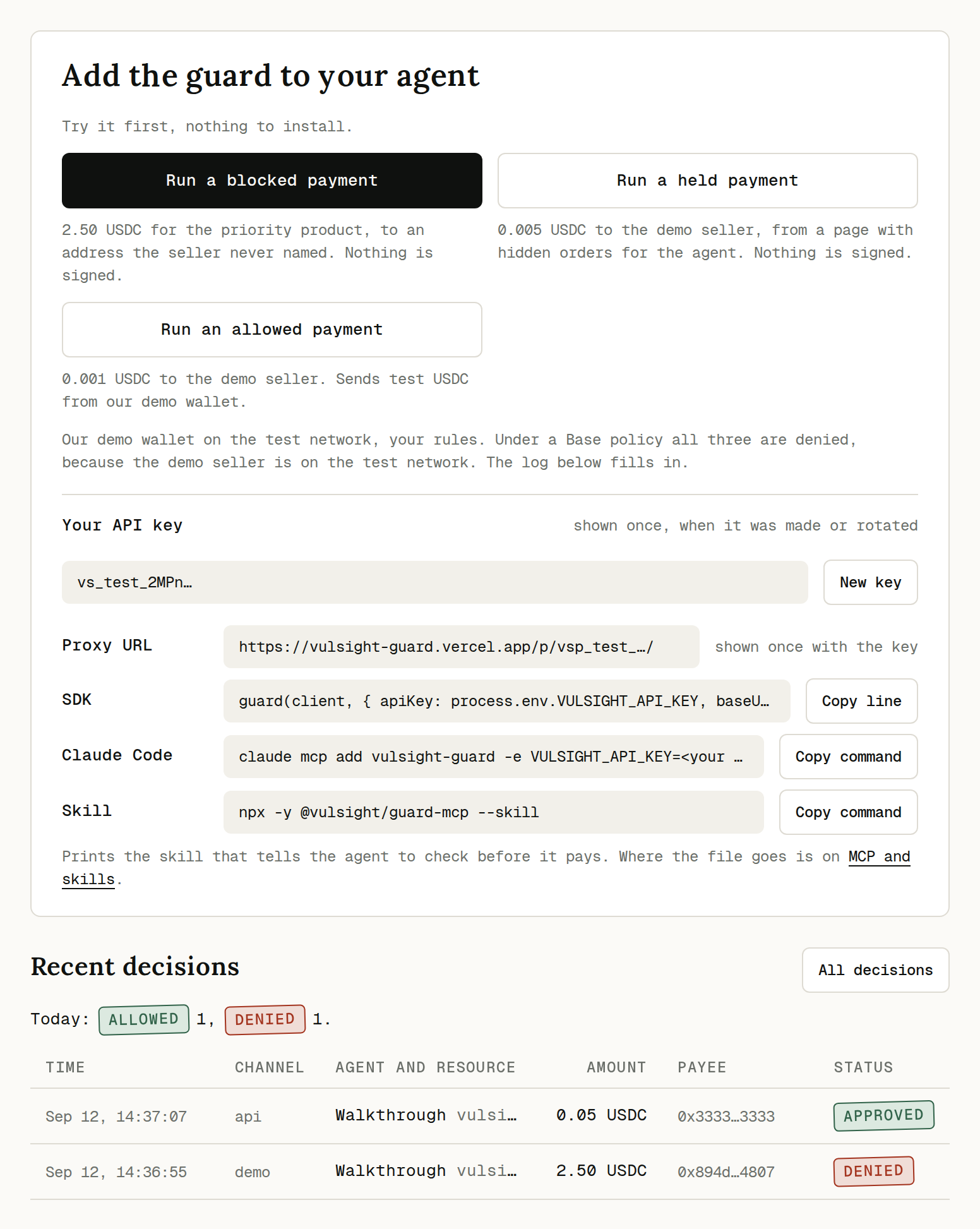
Open Home after you sign up. Copy your API key and the proxy URL beside it.
You see: each one once, with a Copy button. The key starts with vs_test_, and the proxy URL holds a vsp_test_ token.
Read your policy back to check the key.
export VULSIGHT_API_KEY="<your key>"

curl -s -H "authorization: Bearer $VULSIGHT_API_KEY" \
  https://vulsight-guard.vercel.app/api/v1/policy
You see: the policy of a new key.
{
  "allowedNetworks": ["eip155:84532"],
  "allowedAssets": [
    {
      "network": "eip155:84532",
      "address": "0x036CbD53842c5426634e7929541eC2318f3dCF7e"
    }
  ],
  "allowedPayees": [
    {
      "network": "eip155:84532",
      "address": "0x1111111111111111111111111111111111111111"
    }
  ],
  "deniedPayees": [],
  "blocklistEnabled": false,
  "allowedResources": [],
  "perTxLimitAtomic": "100000",
  "dailyCapAtomic": "1000000",
  "holdOverAtomic": "0",
  "velocityPerHour": 20,
  "autoAllowFirstTimeUnderAtomic": "0",
  "contractDenylist": {
    "selectors": [],
    "addresses": []
  },
  "reviewTimeoutSeconds": 120
}
A new key starts with this policy. The demo seller is on your allowlist, on the Payees page. The policy reference explains every field.
| Setting on Policy | Starts at |
|---|---|
| Mode | enforce |
| Networks and assets | Base Sepolia, test USDC |
| Per-transaction limit (USDC) | 0.10 |
| Daily cap across all networks (USDC) | 1.00 |
| Hold over (USDC) | 0.00, off |
| Auto-allow unlisted payees under (USDC) | 0.00, so a payment to a payee off your allowlist is held |
| Payments per hour per network | 20 |
| Review timeout (seconds) | 120 |
The vs_test_ prefix marks the beta, not test money. With Base or Solana Mainnet in the policy, payments move real USDC.
2. See a decision with nothing installed
On Home, press Run a blocked payment.
You see: "Denied before anything was signed." The decision lands under Recent decisions. Open it for the reasons.
Optional. Ask the guard for a decision with curl, in the shell with your key.
curl -s -X POST https://vulsight-guard.vercel.app/api/v1/decisions \
  -H "authorization: Bearer $VULSIGHT_API_KEY" \
  -H "content-type: application/json" \
  -d '{
    "kind": "x402_payment",
    "payTo": "0x1111111111111111111111111111111111111111",
    "amountAtomic": "1000",
    "asset": "0x036CbD53842c5426634e7929541eC2318f3dCF7e",
    "network": "eip155:84532",
    "scheme": "exact",
    "resourceUrl": "https://vulsight-guard.vercel.app/merchant/weather",
    "observed402PayTo": "0x1111111111111111111111111111111111111111",
    "sessionId": "sess_1",
    "contextExcerpt": "Current conditions for Singapore as JSON."
  }'
You see: the decision, with every rule that ran.
{
  "id": "df3c92cd-61ef-4705-8f70-a4fe15881c93",
  "channel": "api",
  "createdAt": "2026-09-03T22:54:48.482Z",
  "status": "allowed",
  "rules": [
    { "id": "network_allowed", "result": "pass" },
    { "id": "asset_allowed", "result": "pass" },
    { "id": "payee_denylisted", "result": "pass" },
    { "id": "payee_matches_402", "result": "pass" },
    { "id": "payee_allowlisted", "result": "pass" },
    { "id": "amount_per_tx", "result": "pass" },
    { "id": "amount_daily_cap", "result": "pass" },
    { "id": "amount_hold_over", "result": "pass" },
    { "id": "velocity_per_hour", "result": "pass" },
    { "id": "contract_call_denied", "result": "pass" },
    { "id": "payment_method_supported", "result": "pass" },
    { "id": "injection_suspected", "result": "pass" },
    { "id": "first_time_payee", "result": "pass" }
  ]
}
status is the decision. A call like this is advisory, not enforced. Your code has to act on the answer, and the proxy URL acts on it for you.
3. Route one payment
Your x402 client pays the demo seller 0.05 test USDC through the proxy URL. The seller is on your allowlist and the amount is under your limits, so the guard allows it.
In a new folder, install an x402 client.
bun add @x402/fetch @x402/evm viemYou see: the three packages in your package.json.
Make a throwaway wallet in the same shell. Paste its address into the Circle faucet and request test USDC on Base Sepolia.
export EVM_PRIVATE_KEY="$(
  node --input-type=module -e '
    import { generatePrivateKey } from "viem/accounts";
    console.log(generatePrivateKey());
  '
)"
node --input-type=module -e '
  import { privateKeyToAccount } from "viem/accounts";
  const key = process.env.EVM_PRIVATE_KEY;
  console.log(privateKeyToAccount(key).address);
'
You see: the wallet's address. The key is exported, never printed.
Export the proxy URL from step 1.
export VULSIGHT_PROXY_URL="<your proxy URL>"You see: nothing. The URL looks like https://vulsight-guard.vercel.app/p/vsp_test_.../, ending in a slash.
Save this program as
agent.ts.import { ExactEvmScheme } from "@x402/evm/exact/client"; import { wrapFetchWithPayment, x402Client } from "@x402/fetch"; import { privateKeyToAccount } from "viem/accounts"; const need = (name: string) => { const value = process.env[name]; if (!value) throw new Error(`Set ${name} before starting the agent.`); return value; }; const key = need("EVM_PRIVATE_KEY") as `0x${string}`; const account = privateKeyToAccount(key); const client = new x402Client().register( "eip155:*", new ExactEvmScheme(account), ); const pay = wrapFetchWithPayment(fetch, client); // The proxy URL shown with your API key, then the seller's URL // with its scheme left out. const proxy = need("VULSIGHT_PROXY_URL"); const seller = "vulsight-guard.vercel.app/merchant/dataset"; const res = await pay(proxy + seller); // 200 allowed or 200 review_approved with the dataset, // 403 denied with the reasons, or 402 review_pending. const status = res.headers.get("guard-status"); console.log(res.status, status, await res.text());Run it with
bun agent.ts, ornode agent.tson Node 22.18 or newer with"type": "module"in yourpackage.json.You see: the status, the guard's decision and the dataset.
200 allowed {"name": "product-reviews", "rows": 10000, "sample": [...]}
The wallet needs no ETH, since the seller's payment service pays the gas. The proxy URL holds a secret token, so keep it out of shared logs and screenshots. If you did not save it, rotate the key on the Keys page for a new one. Rotating replaces the API key too.
The first words the program prints are the HTTP status and the guard's decision.
| It prints | Means | Next step |
|---|---|---|
200 allowed | The guard allowed the payment, and the seller sent the dataset. | Nothing. The payment is on Home. |
403 denied | The guard refused the payment, so nothing was paid. The body lists the reasons. | Look each reason up on Reason codes. Do not pay the seller another way. |
402 review_ | The payment waits for a person on Review. Nothing was paid yet. | Approve it, then run the program again. Step 4 shows how. |
4. See a review
Hold one payment on purpose, so you see a review before a real payment needs you.
On Policy, set Hold over (USDC) to 0.01 and press Save policy.
You see: "Saved. The next decision runs under these rules."
Run
bun agent.tsagain, and open Review.You see: the payment as a card on Review. Its reason reads "The amount 0.05 USDC is over your hold threshold of 0.01 USDC, so it waits for a person."
Press Approve. If the program printed 402 review_pending already, run it once more.
You see: 200 review_approved and the dataset.
Set Hold over (USDC) back to 0 and save.
You see: the next run prints 200 allowed again.
The proxy holds the payment up to 35 seconds while it waits for you. Approve in that time, and the first run prints 200 review_approved. The review page works from a phone. The Reviews page covers the other buttons and the review timeout.
5. Find it on Home
Open Home. Once your agent has a decision outside the demo buttons, Home opens on Today. Recent decisions shows the five newest, and All decisions lists every one. Open one for Why this decision, with each reason.
The same decisions come back over the API, newest first.
curl -s -H "authorization: Bearer $VULSIGHT_API_KEY" \
  "https://vulsight-guard.vercel.app/api/v1/decisions?limit=1"
You see: an array with your latest decision. An empty array means this account has no decisions yet.
If it fails
Find the line the program printed that matches a row. curl prints only the body, so match its error code.
| You see | Means | Next step |
|---|---|---|
Set EVM_ | The shell that runs the program has no wallet key. The same line names VULSIGHT_PROXY_URL when that one is missing. | For VULSIGHT_PROXY_URL, run its export line from step 3 again. For EVM_PRIVATE_KEY, the wallet commands in step 3 make a new wallet, so request test USDC for its address at the Circle faucet before you run the program again. |
{"error":{"code":"missing_ | This shell has no VULSIGHT_API_KEY. See missing_api_key. | Run the export line from step 1 in this shell, then the command again. |
{"error":{"code":"unknown_ | The key is mistyped or was rotated. The message says so if you sent the proxy token instead. See unknown_api_key. | Copy the key again. If you lost it, rotate the key on the Keys page. |
{"error":{"code":"revoked_ | Someone revoked this key on the Keys page. See revoked_api_key. | Create a new key on the Keys page. |
401 null {"error":{"code":"unknown_ | The proxy URL is mistyped, or the key was rotated. See unknown_proxy_token. | Copy the proxy URL again. If you lost it, rotate the key on the Keys page. |
401 null {"error":{"code":"revoked_ | Someone revoked this key on the Keys page. See revoked_proxy_token. | Create a new key on the Keys page. |
402 allowed | The guard allowed the payment, and the seller refused it. Most often the wallet holds no test USDC yet. | Request test USDC for the wallet at the Circle faucet, then run the program again. |